

A step-by-step local SEO guide for Pakistani businesses and startups
Why Google Maps Ranking Matters for Pakistani Businesses
Think about the last time you searched for a restaurant, a mechanic, or a pharmacy near you. You probably opened Google Maps, looked at the top three results, and called one of them — without scrolling further.
Your customers are doing the same thing.
Pakistan’s internet user base has crossed 130 million, and smartphone usage is exploding across cities like Lahore, Karachi, Islamabad, and beyond. Most of these users turn to Google when they need a local product or service. Yet the majority of Pakistani small businesses either have no Google Business Profile at all, or one that’s so incomplete it might as well not exist.
That’s actually great news for you.
Because local SEO competition in Pakistan is still relatively low compared to Western markets, getting your business into Google’s “Local Pack” — the map with three highlighted results — is very achievable in 2026 if you follow the right steps.
This guide walks you through everything: from claiming your profile to managing reviews to building citations. By the end, you’ll have a clear, actionable roadmap to outrank your competitors on Google Maps.
Step 1: Claim and Verify Your Google Business Profile
Before anything else, you need to own your listing.
Go to business.google.com and either create a new profile or claim an existing one (Google sometimes auto-generates listings from publicly available data, so your business may already exist in an unverified state).
How to set it up:
- Sign in with a business Gmail account (not a personal one).
- Search for your business name. If it appears, click “Claim this business.” If not, click “Add your business.”
- Enter your business name, category, address, and phone number accurately.
- Choose your verification method.
Verification options available in Pakistan:
- Postcard: Google mails a card with a PIN to your registered address. Can take 10–14 days — and longer in some cities.
- Phone or SMS: Available for some businesses. Fastest option if offered.
- Email: Available for select account types.
- Video verification: Google may ask you to record a short video of your storefront and interior. This has become more common in 2025–2026 as Google cracks down on fake listings.
Common mistake to avoid: Never create two listings for the same business. Duplicate listings confuse Google’s algorithm and can cause both profiles to rank lower — or get suspended entirely.
Step 2: Optimise Every Section of Your Profile
Most businesses stop after basic verification. That’s a mistake. A fully completed Google Business Profile ranks significantly higher than an incomplete one. Go through every section carefully.
Business name: Use your real, legal business name. Do not stuff keywords into it (e.g., “Ahmed’s Restaurant Best Biryani Lahore”). Google can suspend listings that do this.
Category: This is one of the most important ranking factors. Choose the most accurate primary category first. Then add secondary categories that apply. For example, a Karachi-based eatery might use “Pakistani restaurant” as primary, with “Biryani restaurant” and “Halal restaurant” as secondary.
Business description: You have 750 characters. Use them. Write a natural, readable description that mentions your key services, your location (be specific — include the area like DHA, Gulshan-e-Iqbal, Saddar, or Blue Area), and what makes you different. Sprinkle in relevant keywords without making it feel robotic.
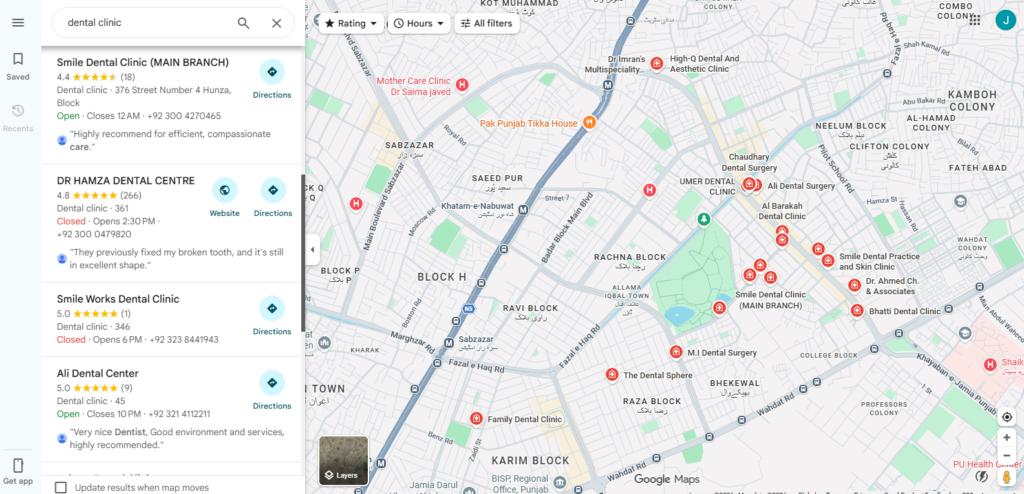
Example description for a Lahore-based dental clinic: “Welcome to Smile Care Dental Clinic, located in DHA Phase 5, Lahore. We offer teeth cleaning, orthodontics, cosmetic dentistry, and dental implants for families and individuals across Lahore. Our team of experienced dentists provides affordable, pain-free care in a modern environment. Book your appointment today.”
Opening hours: Keep these accurate and update them for public holidays and Ramadan timings. Incorrect hours are one of the top reasons businesses lose customer trust on Google Maps.
Phone number and website: Make sure the phone number you list here is the same one on your website, your social media profiles, and any directory listings. Consistency matters — this is called NAP (Name, Address, Phone) consistency, and Google uses it as a trust signal.
Attributes: Don’t overlook this section. Attributes like “accepts cash,” “home delivery available,” “women-owned,” or “wheelchair accessible” help your listing appear in more specific searches and build customer confidence.
Step 3: Add High-Quality Photos and Videos
Google’s own data shows that businesses with photos receive significantly more direction requests and website clicks than those without. Photos make your listing feel real, trustworthy, and worth visiting.
What to upload:
- Cover photo: Your most attractive, well-lit image of your storefront or product.
- Logo: Clean, properly sized business logo.
- Interior photos: Show the inside of your shop, office, or restaurant.
- Exterior photos: Help customers recognise you when they arrive.
- Team photos: A smiling team builds trust.
- Products or menu items: For restaurants and shops especially, this drives conversions.
A small trick many SEOs in Pakistan miss: Before uploading any photo, rename the file with descriptive keywords. Instead of “IMG_4521.jpg,” rename it to “best-karachi-salon-gulshan.jpg.” It’s a minor signal, but it adds up.
Keep your photos fresh. Google rewards active profiles. Add new photos at least once or twice a month — after a renovation, a new product launch, or a seasonal event. Avoid using stock photography. Google’s algorithm has become better at detecting generic imagery, and customers can tell the difference.
Step 4: Build and Manage Customer Reviews
If there is one factor that separates the top three Google Maps results from the rest, it’s reviews. Google’s local ranking algorithm weighs review quantity, average star rating, review recency, and how often the business responds.
How to get more reviews from Pakistani customers:
The most effective method is simply asking — but timing and channel matter.
- WhatsApp follow-up: After a purchase or service, send a brief WhatsApp message. Something like: “Assalamu Alaikum! Thank you for visiting us today. If you’re happy with our service, a quick Google review would mean a lot to us: [your Google review link].”
- QR code at checkout: Print a small QR code that links directly to your review page and place it at your counter, on receipts, or on packaging.
- Verbal ask: Train your staff to politely ask satisfied customers for a review before they leave.
Responding to reviews:
Reply to every review — positive and negative. When responding to a good review, thank the customer by name and mention something specific about their visit. When responding to a bad review, stay calm, apologise for the experience, and offer to resolve it offline. Google sees this engagement as a strong trust signal.
One important warning: Do not buy fake reviews. Google has significantly improved its fake review detection in 2025–2026. A sudden spike of generic 5-star reviews can trigger a suspension of your entire listing — wiping out months of work.
Step 5: Use Google Posts to Stay Active
Google Posts are short updates — similar to social media posts — that appear directly on your Google Maps listing and in Search results. Very few Pakistani businesses use them, making this an easy way to stand out.
Types of posts you can create:
- Offers: A discount, a promotion, or a limited-time deal.
- Events: An upcoming exhibition, a launch event, or an open house.
- Updates: New products, a change in hours, or a new branch opening.
- Products: Showcase individual items with photos and prices.
How often should you post? Aim for at least one to two posts per week. Posts expire after seven days (except event posts), so consistency keeps your profile looking fresh.
Ideas for Pakistani businesses:
- Eid ul-Fitr and Eid ul-Adha promotions
- Independence Day discounts
- Ramadan iftar deals (for restaurants and cafes)
- Winter sale announcements for clothing or electronics shops
- New menu additions or seasonal items
This takes five minutes and keeps your profile active in Google’s eyes.
Step 6: Build Local Citations and NAP Consistency
A “citation” is any mention of your business’s Name, Address, and Phone number on another website. Google uses citations to verify that your business is legitimate and that your information is accurate.
Top Pakistani and relevant directories to list your business on:
- Locally relevant: Pakistan Business Directory, Hamariweb Business, OLX Pakistan (for some categories), PakWheels (auto businesses), Foodpanda and Zomato (restaurants)
- Social profiles: Facebook Business Page, LinkedIn Company Page, Instagram (add your address in bio)
- Industry directories: If you’re in healthcare, list on Marham or Oladoc. If in education, list on Taleemi.
- General directories: Justdial Pakistan, Kompass Pakistan, Yellow Pages Pakistan
The golden rule of citations: Your business name, address, and phone number must be identical across every single listing. This is where most Pakistani businesses make mistakes.
Common inconsistencies to fix:
- Phone number format (use one consistent format everywhere — e.g., +92-300-1234567)
- Address abbreviations (don’t write “St.” on one site and “Street” on another)
- Business name variations (“Ahmed’s Cafe” vs “Ahmeds Cafe” vs “Ahmed Café”)
Go through your existing listings and correct any inconsistencies. If you find old, inactive listings, either update or remove them.
Step 7: On-Page SEO for Your Website
If your business has a website, it gives Google additional signals to confirm your location and relevance. A few targeted actions here can meaningfully strengthen your Maps ranking.
Embed a Google Map on your contact page. Go to Google Maps, search for your verified business listing, click Share, then Embed. Paste the iframe code into your contact or about page. This creates a direct link between your website and your Maps listing.
Add LocalBusiness schema markup. Schema markup is code that tells Google exactly what your business is, where it’s located, and when it’s open. Use Google’s Structured Data Markup Helper or a plugin like Yoast SEO (if you’re on WordPress) to add this. Include your business name, address, phone number, and opening hours.
Create a location-specific landing page. If you haven’t already, create a page on your website targeting keywords like “[your service] in [your city/area].” For example, a Rawalpindi-based accountant might create a page titled “Accounting Services in Rawalpindi — Affordable CA Firm.” This helps Google connect your website content with local search queries.
Summary: Your Google Maps Ranking Checklist
Here’s a quick action list you can use today:
- Claim and verify your Google Business Profile
- Select the correct primary and secondary categories
- Write a keyword-rich, accurate business description
- Upload at least 10 high-quality, real photos
- Add correct business hours, phone number, and website
- Enable relevant business attributes
- Set up a WhatsApp review request message for customers
- Respond to all existing reviews
- Publish your first Google Post this week
- List your business on at least five local Pakistani directories
- Check NAP consistency across all platforms
- Embed a Google Map on your website’s contact page
When will you see results?
With consistent effort across all of the above, most Pakistani businesses can expect measurable improvement in their Maps ranking within 4 to 12 weeks. Factors like your city, how competitive your category is, and how many reviews you accumulate will all influence the timeline.
Local SEO is not a one-time task — it rewards businesses that stay active, keep their information accurate, and genuinely engage with their customers online.
Start today with just one step: claim your Google Business Profile. Everything else follows from there.
Want more local SEO guides tailored for Pakistani businesses? Explore our other articles on keyword research for Urdu vs English audiences, and how to build backlinks for a Pakistani website.